open source · MIT 67 verified artifacts

Learn DevOps by doing. Not by watching.

A field manual you can click. Read the real manifests, run a guided lab, answer questions that adapt to you, fly through a 3D concept atlas, and play a game that explains every concept as you collect it.

No account No tracking Works offline Keyboard accessible
student@controlplane — field manual
Progress saved locallyYour browser. Nobody else.
67real artifacts
2,097lines to learn from
12guided labs
39explained questions
Live, not a mockup

A real product you can click.

Every tab below loads the actual page in an iframe, not a screenshot. Change tabs, scroll the code, filter the quiz, orbit the atlas, start the game. The poster is only there until you press launch.

m0-ar.github.io/DevOpsKodeKloud/explorer.html
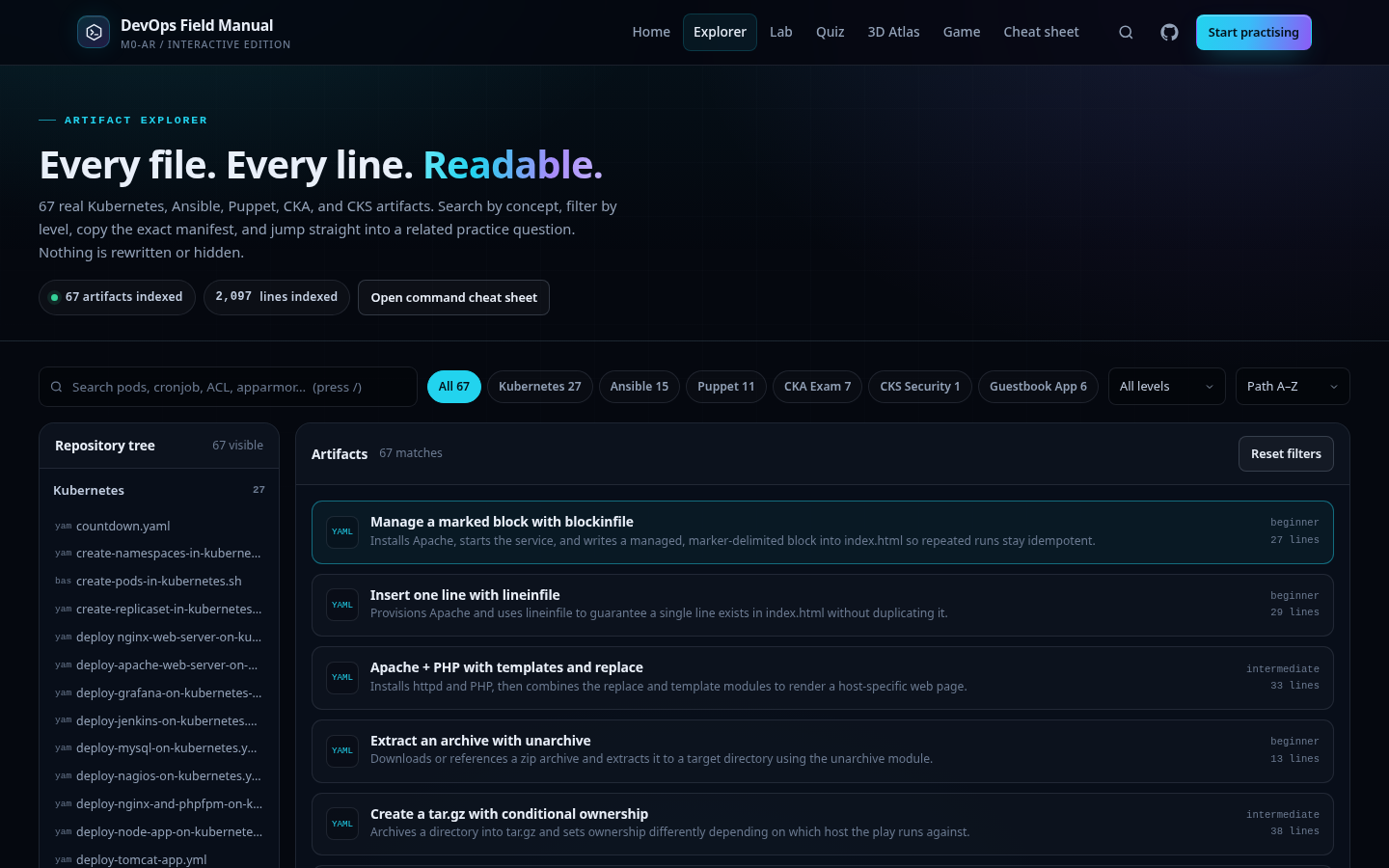
Screenshot of the artifact explorer page

The real explorer is one click away. The poster is a placeholder, not the demo.

Artifact explorer. Search 67 real manifests, filter by level, copy a file, and jump to a related question.

Loaded live from this repository. Nothing is recorded. Browse all pages
01 / REAL

No slideware. No toy examples.

Every screen is powered by the repository itself: 27 Kubernetes manifests, 15 Ansible playbooks, 11 Puppet manifests, 7 CKA tasks, a CKS security challenge and a complete Guestbook deployment. The explorer reads the files, not a copy of them.

02 / HONEST

Modernisation notes, not just copies.

Where an artifact has a 2026 trap — a removed API version, an end-of-life image, a selector mismatch — the explorer says so inside an amber note. You learn the file and the correction.

03 / PRIVATE

Your progress never leaves the page.

XP, streaks, wrong answers and game scores live in localStorage. There is no backend, no analytics, no account and no cookie banner. Disconnect the network after the first load and it still works.

04 / INSPECTABLE

Open source all the way down.

MIT licensed. Plain HTML, CSS and JavaScript. No build step required to read it, no framework to trust, no hidden service. Fork it, teach with it, ship it inside your own onboarding.

Beginner guide

Read this and you are a professional.

You do not need permission, a bootcamp, or a paid account. You need a browser, this page, and six small habits. Work through them in order. Each step points at a real page you can click right now.

  1. 1

    Pick one file and read it out loud

    Open the Explorer and choose one artifact. Read the YAML or playbook line by line. Say what each key does in plain language. If you cannot say it, that is the gap to study — not a reason to stop.

  2. 2

    Run the workflow in the Lab

    The Lab validates the real command shape and shows recorded output. You are practising the sequence, not memorising a screenshot. Type the command instead of reading it.

  3. 3

    Answer three questions without notes

    Use the Quiz. Get them wrong if you must; the explanation is the lesson. Wrong answers return sooner, so the system does the scheduling for you.

  4. 4

    Explain it to another person

    Open the 3D Atlas, pick a node, and explain how it connects to its neighbours. Teaching is the fastest debugger for your own understanding.

  5. 5

    Play one round of Cluster Runner

    The game asks you to make decisions under time pressure while a neural map grows from the concepts you collect. It is revision disguised as play.

  6. 6

    Ship one small change

    Copy a manifest, change one value, apply it in a safe cluster, and observe the difference. Then write down what happened in one sentence. That sentence is experience.

Learning paths

Start where you are.

Three routes through the same material. Each one is a sequence, not a playlist — finish a step before starting the next.

Path 01beginner

Zero to operator

  • Read pods, Deployments and Services
  • Run the first three Kubernetes labs
  • Pass the beginner question set
  • Explain the Guestbook deployment
Path 02exam

CKA sprint

  • Drill jsonpath, logs and triage
  • Practise rollout and rollback
  • Work the seven CKA task notes
  • Re-take only what you miss
Path 03security

Secure the supply chain

  • Scan an image and read the findings
  • Apply AppArmor and least privilege
  • Review RBAC and NetworkPolicy
  • Play the security challenges
What is inside

Six topics. One coherent manual.

The counts below come from the built dataset, not a marketing page. Every artifact is browsable, copyable and linked to practice.

Built for the real world

  • Kubernetes — workloads, services, storage, config, rollouts and troubleshooting.
  • Ansible — modules, loops, facts, conditionals, templating and safe file edits.
  • Puppet — resources, classes, node definitions, services and data separation.
  • CKA — task-shaped exam notes with the exact verification commands.
  • CKS — image scanning, AppArmor, supply chain and least privilege.
  • Guestbook — a multi-tier app you can trace from frontend to Redis.

Honest by design. The lab is a simulator; it never claims to touch a cluster. Outputs are recorded from the real workflow, and the UI says so.

Who it is for

One manual, five kinds of reader.

Beginners

Start with one file, one lab and one quiz. The beginner guide turns that into a repeatable routine.

Exam candidates

CKA and CKS tasks with the verification step included, plus spaced repetition for the details that fade.

Platform teams

Use it as onboarding: a shared vocabulary, real examples and a local-first progress model with nothing to install.

Educators

Fork it, replace the artifacts, keep the engine. The content model is plain JSON and the pages are static HTML.

For teams evaluating this

A serious artifact, not a side project.

This repository is designed to be opened in a meeting, projected on a screen, and inspected line by line. No signup wall, no sales call, no data leaving the room.

0backend services
0trackers or cookies
100%static and forkable
MITlicense

What you can do with it

  • Run an internal onboarding workshop without provisioning a cluster.
  • Use the quiz as a low-stakes readiness check before an exam or a project.
  • Link directly to a file, a lab or a question in documentation.
  • Fork the dataset and publish a company-specific edition.
  • Present the live pages as a portfolio of practical DevOps work.
  • Audit every line because the source is the product.
Questions

The honest answers.

Is the lab a real cluster?

No. It is a browser simulator with recorded output and local validation. That is a deliberate safety choice: you can practise destructive-looking commands without a cloud bill or a broken environment. Every lab says this in the terminal header.

Do I need to install anything?

Not to use the site. Open the live demo, or open docs/index.html in a browser. If you want the exact same local server, run python3 -m http.server inside docs.

Where is my progress stored?

In your browser's localStorage, under a single key. Clearing site data resets it. Nothing is sent anywhere, because there is nowhere to send it.

Can I use this at work or in a course?

Yes. It is MIT licensed. Attribution is appreciated but not required. Do not imply endorsement by KodeKloud, the CNCF, or the vendors named inside the artifacts.

Why do some files have amber notes?

Because the repository is honest about age. A manifest can be a great teaching example and still contain a removed API version, an end-of-life image, or a selector mismatch. The note explains what to change before production.

What makes the 3D pages different?

They are real WebGL scenes, not videos. The atlas is generated from the artifact dataset; the game builds a visible neural map from the concepts you collect. Both pause when the tab is hidden and respect reduced-motion settings.

Start here

Open one file. Run one lab. Learn one thing.

That is the whole method. The rest is repetition, and the site remembers the repetition for you.